SplitterMR
SplitterMR is a library for chunking data into convenient text blocks compatible with your LLM applications.


Important
Version 1.0.0 released – First Stable Release!
We are excited to announce the first stable release of SplitterMR (v1.0.0)! Install it with the following command:
pip install splitter-mr
Highlights:
- 🚀 Stable API consolidating all v0.x features.
- 📖 Readers: Plug-and-play support for Vanilla, MarkItDown, Docling, and Textract, covering formats like text, Office, JSON/YAML, images, HTML, and more.
- 🪓 Splitters: Extensive library of split strategies, including character, word, sentence, paragraph, token, paged, row/column, JSON, semantic, HTML tag, header, and code splitters.
- 🧠 Models: Multimodal Vision-Language support for OpenAI, Azure, Grok, HuggingFace, Gemini, Claude, OpenRouter, and more.
- 🗺️ Embeddings: Fully integrated embeddings from OpenAI, Azure, HuggingFace, Gemini, Claude (via Voyage), and OpenRouter.
- 🎛️ Extras system: Install the minimal core, or extend with
markitdown,docling,textract,mcp,multimodal, orallfor a batteries-included setup. - 📚 Docs: New API reference, real executed notebook examples, and updated architecture diagrams.
- 🔧 Developer Experience: CI/CD pipeline, PyPI publishing, pre-commit checks, and improved cleaning instructions.
- 🐛 Bugfixes: Improved NLTK tokenizers, more robust splitters, and new utilities for HTML => Markdown conversion.
Check out the updated documentation, new examples, and join us in making text splitting and document parsing easier than ever!
Version 1.4.0 - MCP and REST server
SplitterMR adds an optional FastAPI/MCP server for read, split, and read-and-split.
Install it with pip install "splitter-mr[mcp]" and start splitter-mr-mcp. Pass
vision models as model, embeddings as embedding (required for SemanticSplitter),
and extra splitter constructor arguments as kwargs on /api/v1/split or
splitter_kwargs on /api/v1/read-and-split. See the
server docs.
Version 1.3.0 - AWS Textract support
SplitterMR adds TextractReader for AWS Textract OCR on local PDFs, Office files, and images. Install it with pip install "splitter-mr[textract]" and configure the standard boto3 credential chain (AWS_ACCESS_KEY_ID, AWS_SECRET_ACCESS_KEY, AWS_DEFAULT_REGION). See the Reader docs.
Version 1.2.0 - OpenRouter support
Use a single OpenRouter API key to access many vision and embedding models through OpenRouterVisionModel and OpenRouterEmbedding. See the vision and embedding docs.
Features
Different input formats
SplitterMR can read data from multiples sources and files. To read the files, it uses the Reader components, which inherits from a Base abstract class, BaseReader. This object allows you to read the files as a properly formatted string, or convert the files into another format (such as markdown or json).
Currently, there are supported four readers: VanillaReader, MarkItDownReader, DoclingReader, and TextractReader. These are the differences between each Reader component:


| Reader | Unstructured files & PDFs | MS Office suite files | Tabular data | Files with hierarchical schema | Image files | Markdown conversion |
|---|---|---|---|---|---|---|
VanillaReader |
txt, md, pdf |
xlsx, docx, pptx |
csv, tsv, parquet |
json, yaml, html, xml |
jpg, png, webp, gif |
Yes |
MarkItDownReader |
txt, md, pdf |
docx, xlsx, pptx |
csv, tsv |
json, html, xml |
jpg, png, pneg |
Yes |
DoclingReader |
txt, md, pdf |
docx, xlsx, pptx |
– | html, xhtml |
png, jpeg, tiff, bmp, webp |
Yes |
TextractReader |
txt, md, pdf |
docx, xlsx, pptx |
– | json, yaml |
png, jpg, jpeg, webp, gif, bmp, tif, tiff, svg |
No |
Several splitting methods
SplitterMR allows you to split files in many different ways depending on your needs. The available splitting methods are described in the following table:
| Splitting Technique | Description |
|---|---|
| Character Splitter | Splits text into chunks based on a specified number of characters. Supports overlapping by character count or percentage. Parameters: chunk_size (max chars per chunk), chunk_overlap (overlapping chars: int or %). Compatible with: Text. |
| Word Splitter | Splits text into chunks based on a specified number of words. Supports overlapping by word count or percentage. Parameters: chunk_size (max words per chunk), chunk_overlap (overlapping words: int or %). Compatible with: Text. |
| Sentence Splitter | Splits text into chunks by a specified number of sentences. Allows overlap defined by a number or percentage of words from the end of the previous chunk. Customizable sentence separators (e.g., ., !, ?). Parameters: chunk_size (max sentences per chunk), chunk_overlap (overlapping words: int or %), sentence_separators (list of characters). Compatible with: Text. |
| Paragraph Splitter | Splits text into chunks based on a specified number of paragraphs. Allows overlapping by word count or percentage, and customizable line breaks. Parameters: chunk_size (max paragraphs per chunk), chunk_overlap (overlapping words: int or %), line_break (delimiter(s) for paragraphs). Compatible with: Text. |
| Recursive Splitter | Recursively splits text based on a hierarchy of separators (e.g., paragraph, sentence, word, character) until chunks reach a target size. Tries to preserve semantic units as long as possible. Parameters: chunk_size (max chars per chunk), chunk_overlap (overlapping chars), separators (list of characters to split on, e.g., ["\n\n", "\n", " ", ""]). Compatible with: Text. |
| Keyword Splitter | Splits text into chunks around matches of specified keywords, using one or more regex patterns. Supports precise boundary control—matched keywords can be included before, after, both sides, or omitted from the split. Each keyword can have a custom name (via dict) for metadata counting. Secondary soft-wrapping by chunk_size is supported. Parameters: patterns (list of regex patterns, or dict mapping names to patterns), include_delimiters ("before", "after", "both", or "none"), flags (regex flags, e.g. re.MULTILINE), chunk_size (max chars per chunk, soft-wrapped). Compatible with: Text. |
| Token Splitter | Splits text into chunks based on the number of tokens, using various tokenization models (e.g., tiktoken, spaCy, NLTK). Useful for ensuring chunks are compatible with LLM context limits. Parameters: chunk_size (max tokens per chunk), model_name (tokenizer/model, e.g., "tiktoken/cl100k_base", "spacy/en_core_web_sm", "nltk/punkt"), language (for NLTK). Compatible with: Text. |
| Paged Splitter | Splits text by pages for documents that have page structure. Each chunk contains a specified number of pages, with optional word overlap. Parameters: num_pages (pages per chunk), chunk_overlap (overlapping words). Compatible with: Word, PDF, Excel, PowerPoint. |
| Row/Column Splitter | For tabular formats, splits data by a set number of rows or columns per chunk, with possible overlap. Row-based and column-based splitting are mutually exclusive. Parameters: num_rows, num_cols (rows/columns per chunk), overlap (overlapping rows or columns). Compatible with: Tabular formats (csv, tsv, parquet, flat json). |
| JSON Splitter | Recursively splits JSON documents into smaller sub-structures that preserve the original JSON schema. Parameters: max_chunk_size (max chars per chunk), min_chunk_size (min chars per chunk). Compatible with: JSON. |
| Semantic Splitter | Splits text into chunks based on semantic similarity, using an embedding model and a max tokens parameter. Useful for meaningful semantic groupings. Parameters: embedding_model (model for embeddings), max_tokens (max tokens per chunk). Compatible with: Text. |
| HTML Tag Splitter | Splits HTML content based on a specified tag, or automatically detects the most frequent and shallowest tag if not specified. Each chunk is a complete HTML fragment for that tag. Parameters: chunk_size (max chars per chunk), tag (HTML tag to split on, optional). Compatible with: HTML. |
| Header Splitter | Splits Markdown or HTML documents into chunks using header levels (e.g., #, ##, or <h1>, <h2>). Uses configurable headers for chunking. Parameters: headers_to_split_on (list of headers and semantic names), chunk_size (unused, for compatibility). Compatible with: Markdown, HTML. |
| Code Splitter | Splits source code files into programmatically meaningful chunks (functions, classes, methods, etc.), aware of the syntax of the specified programming language (e.g., Python, Java, Kotlin). Uses language-aware logic to avoid splitting inside code blocks. Parameters: chunk_size (max chars per chunk), language (programming language as string, e.g., "python", "java"). Compatible with: Source code files (Python, Java, Kotlin, C++, JavaScript, Go, etc.). |
Architecture
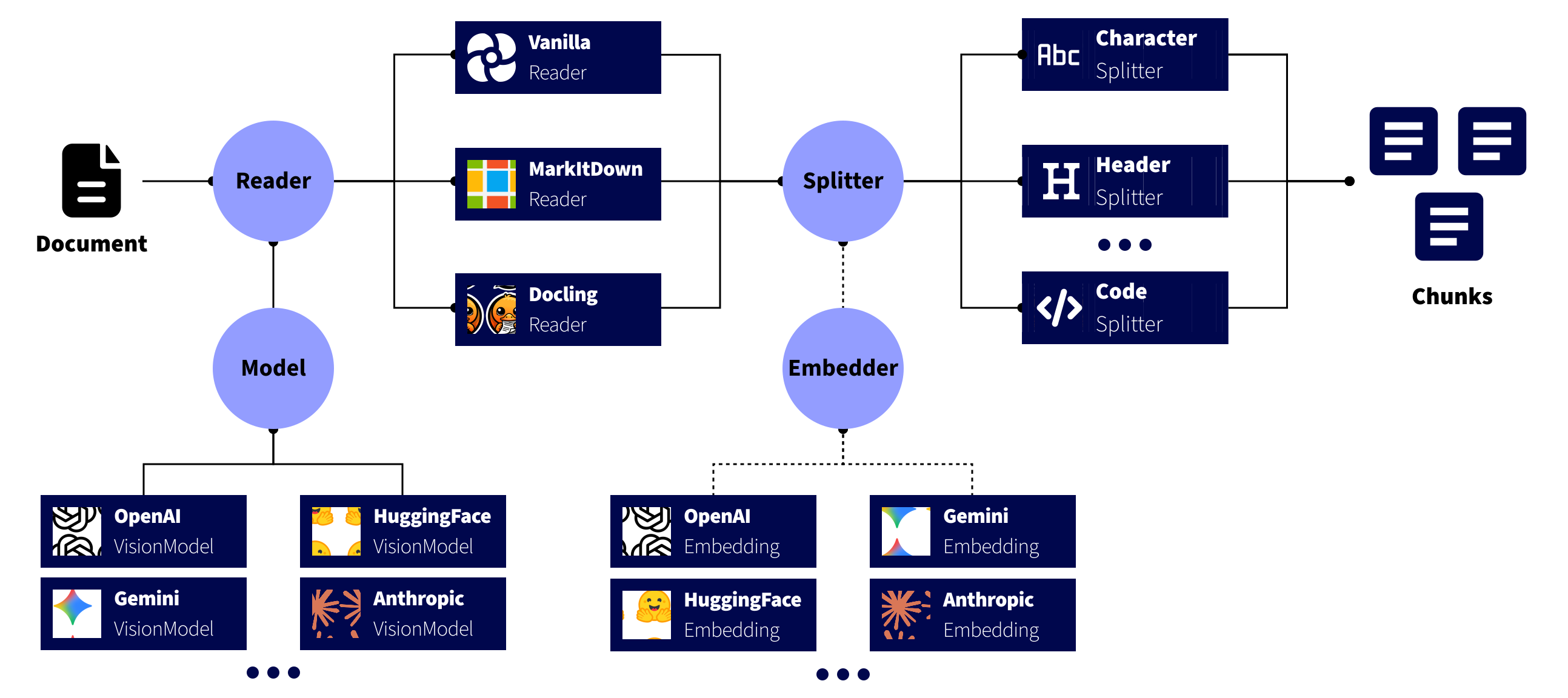
SplitterMR is designed around a modular pipeline that processes files from raw data all the way to chunked, LLM-ready text. There are three main components: Readers, Models and Splitters.
- Readers
- The
BaseReadercomponents read a file and optionally converts to other formats to subsequently conduct a splitting strategy. - Supported readers (e.g.,
VanillaReader,MarkItDownReader,DoclingReader,TextractReader) produce aReaderOutputdictionary containing:- Text content (in
markdown,text,jsonor another format). - Document metadata.
- Conversion method.
- Text content (in
- The
- Models:
- The
BaseModelcomponent is used to read non-text content using a Visual Language Model (VLM). - Supported models include
OpenAI,AzureOpenAI,Grok,HuggingFace,Gemini,Anthropic, andOpenRouter. - All the models have a
analyze_contentmethod which returns the LLM response based on a prompt, the client and the model parameters.
- The
- Splitters
- The
BaseSplittercomponents take theReaderOutputtext content and divide that text into meaningful chunks for LLM or other downstream use. - Splitter classes (e.g.,
CharacterSplitter,SentenceSplitter,RecursiveCharacterSplitter, etc.) allow flexible chunking strategies with optional overlap and rich configuration.
- The
- Embedders
- The
BaseEmbeddercomponents are used to encode the text into embeddings. These embeddings are used to split text by semantic similarity. - Supported models include
OpenAI,AzureOpenAI,HuggingFace,Gemini,Anthropic(Voyage), andOpenRouter. - All the models have a
encode_textmethod which returns the embeddings based on a text, the client and the model parameters.
- The
How to install
Package is published on PyPi.
By default, only the core dependencies are installed. If you need additional features (e.g., MarkItDown, Docling, Textract, multimodal processing), you can install the corresponding extras.
Core install
Installs the basic text splitting and file parsing features (lightweight, fast install):
pip install splitter-mr
Optional extras
| Extra | Description | Example install command |
|---|---|---|
markitdown |
Adds MarkItDown support for rich-text document parsing (HTML, DOCX, etc.). | pip install "splitter-mr[markitdown]" |
docling |
Adds Docling support for high-quality PDF/document to Markdown conversion. | pip install "splitter-mr[docling]" |
textract |
Adds AWS Textract OCR support through boto3 for PDFs, Office files, and images. | pip install "splitter-mr[textract]" |
mcp |
FastAPI application with typed REST endpoints and a Streamable HTTP MCP server. Pass vision models as model and embeddings as embedding. |
pip install "splitter-mr[mcp]" |
multimodal |
Enables computer vision, OCR, and audio features — includes PyTorch, EasyOCR, OpenCV, Transformers, etc. | pip install "splitter-mr[multimodal]" |
all |
Installs everything above (MarkItDown + Docling + Textract + MCP + Multimodal + Azure). Heavy install (~GBs). | pip install "splitter-mr[all]" |
Multiple extras
You can combine extras by separating them with commas:
pip install "splitter-mr[markitdown,docling,textract]"
Using other package managers
You can also install it with uv, conda or poetry:
uv add splitter-mr
Note
Python 3.11 or greater is required to use this library.
How to use
Read files
Firstly, you need to instantiate an object from a BaseReader class, for example, VanillaReader.
from splitter_mr.reader import VanillaReader

reader = VanillaReader()
To read any file, provide the file path within the read() method. If you use DoclingReader or MarkItDownReader, your files will be automatically parsed to markdown text format. If you use TextractReader, visual files are OCR'd with AWS Textract after PNG normalization, while text-native formats (md, json, yaml, txt) are delegated to VanillaReader. The result of this reader will be a ReaderOutput object, a dictionary with the following shape:
reader_output = reader.read('https://raw.githubusercontent.com/andreshere00/Splitter_MR/refs/heads/main/data/lorem_ipsum.txt')
print(reader_output)
text='Lorem ipsum dolor sit amet, consectetur adipiscing elit. Vestibulum sit amet ultricies orci. Nullam et tellus dui.',
document_name='lorem_ipsum.txt',
document_path='https://raw.githubusercontent.com/andreshere00/Splitter_MR/refs/heads/main/data/lorem_ipsum.txt',
document_id='732b9530-3e41-4a1a-a4ea-1d9d6fe815d3',
conversion_method='txt',
reader_method='vanilla',
ocr_method=None,
page_placeholder=None,
metadata={}
Note
Note that you can read from an URL, a variable and from a file_path. See Developer guide.
Split text
To split the text, first import the class that implements your desired splitting strategy (e.g., by characters, recursively, by headers, etc.). Then, create an instance of this class and call its split method, which is defined in the BaseSplitter class.
For example, we will split by characters with a maximum chunk size of 50, with an overlap between chunks:
from splitter_mr.splitter import CharacterSplitter

char_splitter = CharacterSplitter(chunk_size=50, chunk_overlap = 10)
splitter_output = char_splitter.split(reader_output)
print(splitter_output)
chunks=['Lorem ipsum dolor sit amet, consectetur adipiscing', 'adipiscing elit. Vestibulum sit amet ultricies orc', 'ricies orci. Nullam et tellus dui.'],
chunk_id=['db454a9b-32aa-4fdc-9aab-8770cae99882', 'e67b427c-4bb0-4f28-96c2-7785f070d1c1', '6206a89d-efd1-4586-8889-95590a14645b'],
document_name='lorem_ipsum.txt',
document_path='https://raw.githubusercontent.com/andreshere00/Splitter_MR/refs/heads/main/data/lorem_ipsum.txt',
document_id='732b9530-3e41-4a1a-a4ea-1d9d6fe815d3',
conversion_method='txt',
reader_method='vanilla',
ocr_method=None,
split_method='character_splitter',
split_params={'chunk_size': 50, 'chunk_overlap': 10},
metadata={}
The returned object is a SplitterOutput dataclass, which provides all the information you need to further process your data. You can easily add custom metadata, and you have access to details such as the document name, path, and type. Each chunk is uniquely identified by an UUID, allowing for easy traceability throughout your LLM workflow.
Compatibility with vision tools for image processing and annotations
Pass a VLM model to any Reader via the model parameter:
from splitter_mr.reader import VanillaReader
from splitter_mr.model.models import OpenRouterVisionModel

model = OpenRouterVisionModel()
reader = VanillaReader(model=model)
output = reader.read(file_path="data/sample_pdf.pdf")
print(output.text)
These VLMs can be used for captioning, annotation or text extraction. In fact, you can use these models to process the files as you want using the prompt parameter in the read method for every class which inherits from BaseReader.
Note
To see more details, consult documentation here.
Complete workflows
For end-to-end examples covering fixed-size splitting, semantic chunking, multimodal PDF reading, RAG ingestion, and the MCP/REST server, see SKILL.md.
MCP and REST server
Install the optional extra and start the FastAPI app. Swagger documents the typed
REST wrappers; MCP tools share the same pipeline at /mcp.
pip install "splitter-mr[mcp]"
splitter-mr-mcp
- Swagger UI:
http://127.0.0.1:8000/docs - ReDoc:
http://127.0.0.1:8000/redoc - OpenAPI:
http://127.0.0.1:8000/openapi.json - Health:
http://127.0.0.1:8000/health - MCP (Streamable HTTP):
http://127.0.0.1:8000/mcp
import httpx

payload = {
    "file_path": "Lorem ipsum dolor sit amet.",
    "reader": {"reader": "VanillaReader"},
    "kwargs": {"document_name": "lorem.txt"},
    "splitter": {"splitter": "CharacterSplitter", "chunk_size": 50, "chunk_overlap": 10},
}
response = httpx.post("http://127.0.0.1:8000/api/v1/read-and-split", json=payload)
print(response.json()["chunks"])
import asyncio
from fastmcp import Client

async def main() -> None:
    async with Client("http://127.0.0.1:8000/mcp") as client:
        result = await client.call_tool(
            "read_and_split",
            {
                "request": {
                    "file_path": "Lorem ipsum dolor sit amet.",
                    "reader": {"reader": "VanillaReader"},
                    "kwargs": {"document_name": "lorem.txt"},
                    "splitter": {"splitter": "RecursiveCharacterSplitter"},
                }
            },
        )
        print(result)

asyncio.run(main())
POST /api/v1/read mirrors BaseReader.read(file_path, model=None, **kwargs).
Pass a vision model as the top-level model object (requires
splitter-mr[multimodal]); omit api_key to use provider environment variables.
POST /api/v1/split accepts a full ReaderOutput, a splitter discriminator,
optional extra constructor arguments in kwargs, and an optional embedding
object. kwargs is how you pass splitter parameters other than chunk_size and
chunk_overlap (for example patterns, separators, include_delimiters,
headers_to_split_on, language). SemanticSplitter requires embedding
(OpenAI, Azure OpenAI, OpenRouter, Gemini, Hugging Face, or Anthropic/Voyage).
POST /api/v1/read-and-split uses the same read fields (file_path, reader,
model, kwargs) plus splitter, optional embedding, and splitter_kwargs.
File paths are server-local and disabled until SPLITTER_MR_ALLOWED_ROOT is set.
URL sources require SPLITTER_MR_ALLOW_URLS=true. The server is stateless and does
not persist chunks. This version has no authentication: deploy it only on a private
network or behind an authenticated reverse proxy. Inline API keys may be captured
by proxies, MCP clients, or traces.
poe docs serves MkDocs on port 8001 so it does not collide with
splitter-mr-mcp on port 8000.
Docker:
docker build -f Dockerfile.server -t splitter-mr-mcp .
docker run --rm -p 8000:8000 splitter-mr-mcp
See the server API reference for environment variables, tool contracts, and security defaults.
Updates
Next features
- Add support to read Latex files using
VanillaReader. - Persist chunked documents and answer queries over them via MCP.
- Add a new
BaseVisionModelclass to support generic API-provided models. - Add asynchronous methods for Splitters and Readers.
- Add batch methods to process several documents at once.
- Add support to read formulas.
- Add classic OCR models:
easyocrandpytesseract. - Add support to generate output in
markdownfor all data types in VanillaReader. - Add methods to support Markdown, JSON and XML data types when returning output.
Previously implemented (^v1.0.0)
- Provide an MCP server (and FastAPI REST wrappers) for read, split, and read-and-split.
- Add examples on how to implement SplitterMR in RAGs, MCPs and Agentic RAGs.
- Add a method to read PDFs using Textract.
- Add OpenRouter support for vision and embedding models.
- Add custom Error and Warning handling for better logging and traceability.
- Add
KeywordSplittersupport.
Previously implemented (up to v1.0.0)
- Add embedding model support.
- Add OpenAI embeddings model support.
- Add OpenRouter embeddings model support.
- Add HuggingFace embeddings model support.
- Add Gemini embeddings model support.
- Add Claude Anthropic embeddings model support.
- Add OpenRouter embeddings model support.
- Add Vision models:
- Add OpenAI vision model support.
- Add OpenRouter embeddings model support.
- Add Grok VLMs model support.
- Add HuggingFace VLMs model support.
- Add Gemini VLMs model support.
- Add Claude Anthropic VLMs model support.
- Add OpenRouter VLMs model support.
- Modularize library into several sub-libraries.
- Implement a method to split by embedding similarity:
SemanticSplitter. - Add new supported formats to be analyzed with OpenAI and AzureOpenAI models.
- Add support to read images using
VanillaReader. - Add support to read
xlsx,docxandpptxfiles usingVanillaReader. - Add support to read images using
VanillaReader. - Implement a method to split a document by pages (
PagedSplitter). - Add support to read PDF as scanned pages.
- Add support to change image placeholders.
- Add support to change page placeholders.
- Add Pydantic models to define Reader and Splitter outputs.
Contact
If you want to collaborate, please contact me through the following media: